AWS and Azure Automation
Cloud Automation: Your Gateway to Effortless Infrastructure Excellence.
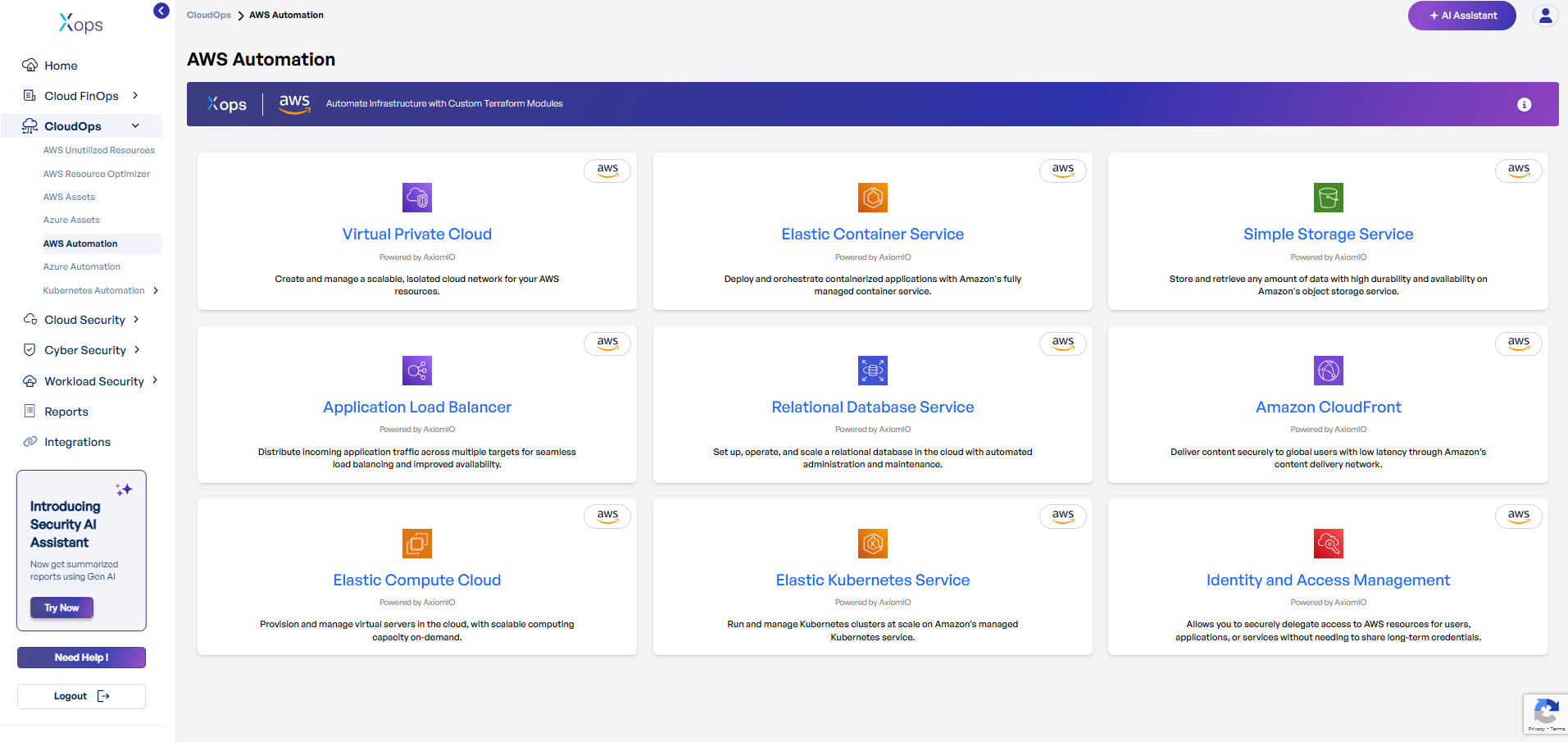
AWS Automation Suite - Production Ready Services
AWS Cloud Automation Deployment Guide
-
Select an AWS Service.
-
In X-ops, navigate to CloudOps → AWS Automation.
-
Click on the desired service (e.g., Virtual Private Cloud, Elastic Compute Cloud, S3).
-
-
Review Prerequisites.
-
Check the Overview for service description.
-
Confirm Terraform (>=1.0) and AWS Provider versions.
-
Ensure your AWS IAM role permissions allow resource creation.
-
-
Configure Inputs.
-
Open the Inputs section.
-
Fill in required parameters (e.g.,
vpc_cidr,availability_zones). -
Accept sensible defaults for optional settings or customize as needed.
-
-
Copy and Customize Terraform.
-
Scroll to Usage and click Copy Code.
-
Paste into
main.tfand replace placeholders with your values. -
Update network ranges, region, and tags.
-
-
Initialize and Deploy.
-
Run
terraform initto set up providers. -
Run
terraform fmtandterraform validate. -
Run
terraform planto preview changes. -
Run
terraform applyto create resources.
-
-
Verify Outputs.
-
Check the Outputs section for IDs, IPs, and endpoints.
-
Log in to the AWS Console to confirm resources exist.
-
Test connectivity and review security settings.
-
Virtual Private Cloud (VPC)
Create and manage a scalable, isolated cloud network for your AWS resources.
-
What it does: Automatically provisions secure network infrastructure with public/private subnets, NAT gateways, and routing tables.
-
Why you'll love it: Deploy enterprise-grade networking in minutes, not hours.
-
Perfect for: Applications requiring secure, multi-tier architecture.
Elastic Container Service (ECS)
Deploy and orchestrate containerized applications with Amazon's fully managed container service.
-
What it does: Sets up container clusters, task definitions, and load balancing for your applications.
-
Why you'll love it: Scale your applications seamlessly without managing servers.
-
Perfect for: Microservices architectures and modern application deployments.
Simple Storage Service (S3)
Store and retrieve any amount of data with high durability and availability on Amazon's object storage service.
-
What it does: Creates secure, scalable storage buckets with lifecycle policies and access controls.
-
Why you'll love it: 99.999999999% (11 9's) of durability with intelligent cost optimization.
-
Perfect for: Data backup, content distribution, and data lakes.
Application Load Balancer (ALB)
Distribute incoming application traffic across multiple targets for seamless load balancing and improved availability.
-
What it does: Routes traffic intelligently across multiple availability zones with health checks.
-
Why you'll love it: Automatic failover and SSL termination for high availability.
-
Perfect for: Web applications requiring high performance and reliability.
Relational Database Service (RDS)
Set up, operate, and scale a relational database in the cloud with automated administration and maintenance.
-
What it does: Deploys managed databases with automated backups, patches, and monitoring.
-
Why you'll love it: Focus on your data, not database management.
-
Perfect for: Applications requiring ACID compliance and complex queries.
Amazon CloudFront
Deliver content securely to global users with low latency through Amazon's content delivery network.
-
What it does: Sets up global edge locations for fast content delivery with SSL/TLS encryption.
-
Why you'll love it: Accelerate your website performance worldwide.
-
Perfect for: Global applications and content distribution.
Elastic Compute Cloud (EC2)
Provision and manage virtual servers in the cloud, with scalable computing capacity on-demand.
-
What it does: Launches configured virtual machines with auto-scaling and security groups.
-
Why you'll love it: Pay only for what you use with instant scalability.
-
Perfect for: Web servers, development environments, and compute-intensive applications.
Elastic Kubernetes Service (EKS)
Run and manage Kubernetes clusters at scale on Amazon's managed Kubernetes service.
-
What it does: Deploys production-ready Kubernetes clusters with worker nodes and networking.
-
Why you'll love it: Container orchestration without the operational overhead.
-
Perfect for: Modern applications requiring container orchestration.
Identity and Access Management (IAM)
Allows you to securely delegate access to AWS resources for users, applications, or services without needing to share long-term credentials.
-
What it does: Creates secure access policies, roles, and permissions for your AWS resources.
-
Why you'll love it: Zero-trust security with granular access control.
-
Perfect for: Enterprise environments requiring strict security governance.
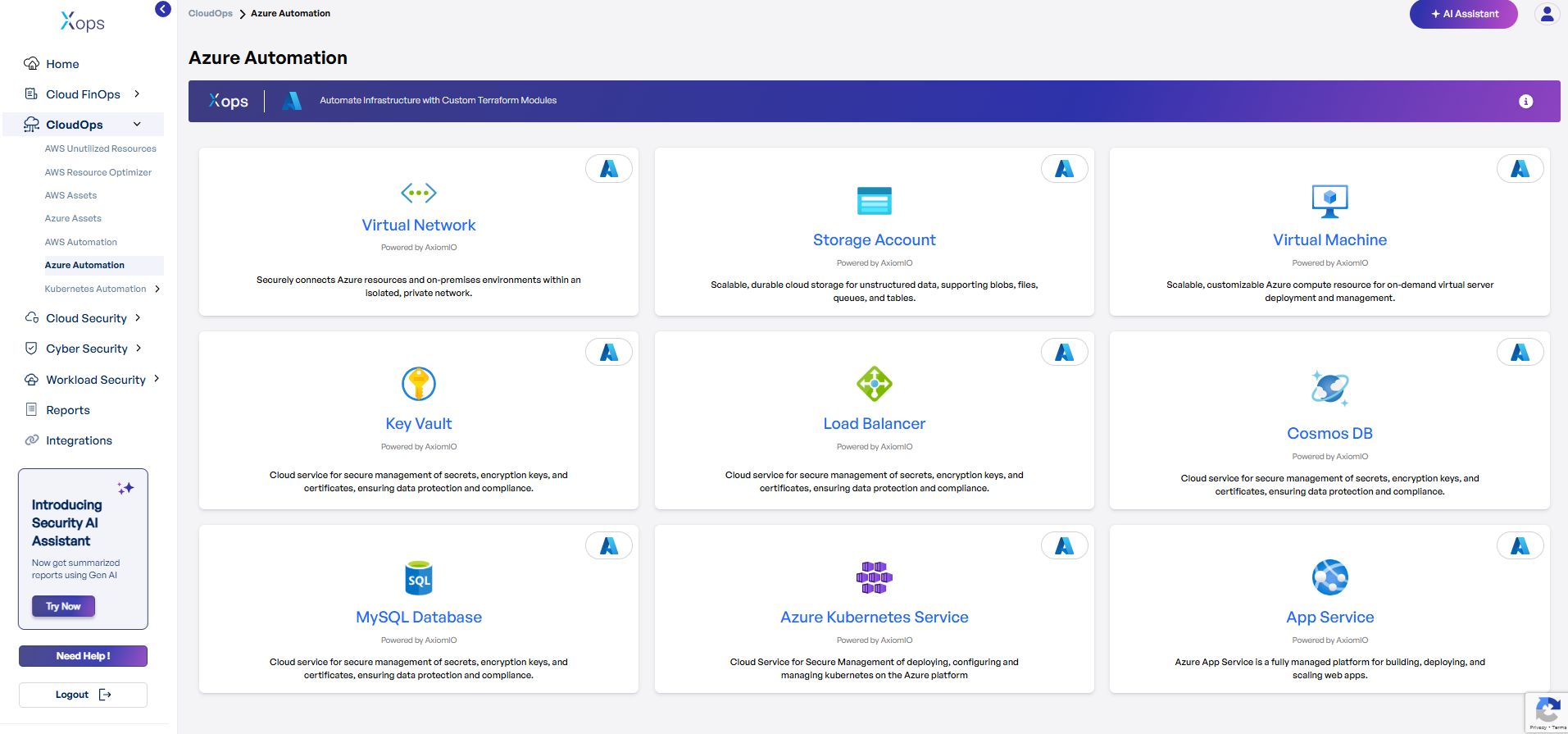
Azure Automation Suite - Enterprise Ready Services
Azure Cloud Automation Deployment Guide
-
Select an Azure Service.
-
In X-ops, navigate to CloudOps → Azure Automation.
-
Click on the desired service (e.g., Virtual Network, Storage Account, Virtual Machine).
-
-
Review Prerequisites.
-
Check the Overview for service capabilities.
-
Confirm Terraform (>=1.0) and Azure Provider versions.
-
Ensure your Azure service principal has necessary RBAC roles.
-
-
Configure Inputs.
-
Open the Inputs section.
-
Complete required fields (e.g.,
resource_group_name,location). -
Use default values for optional parameters or tailor them.
-
-
Copy and Customize Terraform.
-
Scroll to Usage and click Copy Code.
-
Paste into
main.tfand replace placeholders with your specifics. -
Adjust subnets, VM sizes, and tags to fit your environment.
-
-
Initialize and Deploy.
-
Run
terraform initto initialize providers. -
Run
terraform fmtandterraform validate. -
Run
terraform planto review planned changes. -
Run
terraform applyto provision resources.
-
-
Verify Outputs.
-
Check the Outputs section for resource IDs and endpoints.
-
Log in to the Azure Portal to confirm resource creation.
-
Validate network connectivity and role assignments.
-
Virtual Network
Securely connects Azure resources and on-premises environments within an isolated, private network.
-
What it does: Creates secure network infrastructure with subnets, security groups, and routing.
-
Why you'll love it: Enterprise-grade networking with hybrid connectivity options.
-
Perfect for: Multi-tier applications and secure communication.
Storage Account
Scalable, durable cloud storage for unstructured data, supporting blobs, files, queues, and tables.
-
What it does: Provisions secure storage with lifecycle management and redundancy options.
-
Why you'll love it: Multiple storage tiers for cost optimization.
-
Perfect for: Data archiving, application storage, and backup solutions.
Virtual Machine
Scalable, customizable Azure compute resource for on-demand virtual server deployment and management.
-
What it does: Deploys configured VMs with networking, storage, and security settings.
-
Why you'll love it: Full control over your computing environment.
-
Perfect for: Legacy applications and specialized workloads.
Key Vault
Cloud service for secure management of secrets, encryption keys, and certificates, ensuring data protection and compliance.
-
What it does: Centralized secret management with access policies and audit logging.
-
Why you'll love it: Hardware security module (HSM) backed encryption.
-
Perfect for: Securing application secrets and encryption keys.
Load Balancer
Cloud service for secure management of secrets, encryption keys, and certificates, ensuring data protection and compliance.
-
What it does: Distributes traffic across healthy instances with automatic failover.
-
Why you'll love it: High availability with health monitoring.
-
Perfect for: Applications requiring consistent performance and uptime.
Cosmos DB
Cloud service for secure management of secrets, encryption keys, and certificates, ensuring data protection and compliance.
-
What it does: Deploys globally distributed, multi-model database with automatic scaling.
-
Why you'll love it: Single-digit millisecond latency worldwide.
-
Perfect for: Global applications requiring fast data access.
MySQL Database
Cloud service for secure management of secrets, encryption keys, and certificates, ensuring data protection and compliance.
-
What it does: Sets up managed MySQL instances with automated maintenance.
-
Why you'll love it: Focus on your applications while we handle database operations.
-
Perfect for: Web applications and content management systems.
Azure Kubernetes Service (AKS)
Cloud Service for Secure Management of deploying, configuring and managing Kubernetes on the Azure platform.
-
What it does: Provisions managed Kubernetes clusters with integrated monitoring.
-
Why you'll love it: Container orchestration with Azure integration.
-
Perfect for: Cloud-native applications and DevOps workflows.
App Service
Azure App Service is a fully managed platform for building, deploying, and scaling web apps.
-
What it does: Deploys web applications with automatic scaling and SSL certificates.
-
Why you'll love it: Deploy from code to production in minutes.
-
Perfect for: Web applications and APIs requiring rapid deployment.