
Submitting Support Requests
Submitting Support Requests
To ensure a smooth experience, users can submit support requests through the platform's Need Help section. Follow the steps below to request assistance.
-
Log in to the Platform
- Access the platform and sign in using your credentials.
-
Locate the "Need Help" Option
- Navigate to the side navigation panel on the left-hand side of the screen.
- Scroll to the bottom and click on the Need Help option.

-
-
- This action will open the Let’s Connect support request pop-up.
-
Fill in the Help Request Form
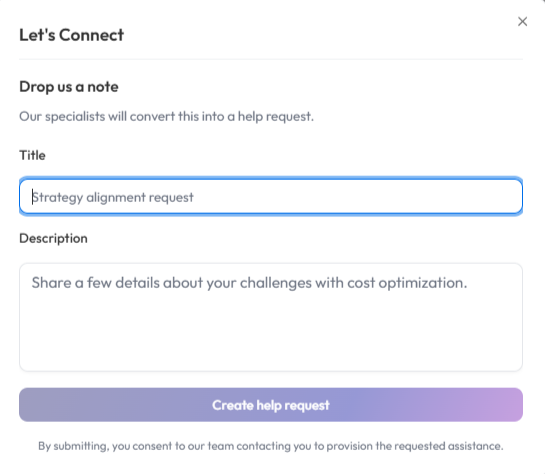
In the Let’s Connect window, provide the following details:
-
-
Title Field:
- Enter a clear and concise title for your request (for example: Strategy alignment request, Issue with scan results, or Access support).
-
Description Field:
- Provide detailed information about your request or issue.
- Include relevant details such as the problem you are experiencing, required assistance, or any additional context that will help the support team understand your request.
-
- Submit the Request
- After entering the required details, click Create help request to submit your support request.
- Confirmation
- A confirmation message will appear once the request is successfully submitted.